WorQua – Field Service Management & Multi-Tenancy Platform
- Home
- portfolio
- .Net Core
- ABP Framework
- Angular
- QuickBooks
- WorQua – Field Service Management & Multi-Tenancy Platform
01. WorQua
Project Overview: A comprehensive field service management software solution designed to automate field work operations, manage multiple client tenancies, streamline work orders, dispatch technicians, and integrate with accounting systems like QuickBooks. The platform serves businesses that manage field services, property maintenance, and technician scheduling across multiple locations.
Core Modules & Features:
1. Project Management Module
Gantt Chart & Timeline View:
- Interactive Gantt chart with drag-and-drop functionality
- Multi-level task hierarchy and dependencies
- Timeline spanning February 2019 to March 2019 (expandable)
Software Development Project Example:
- Main Phase: Software Development (2/2… – 7/4…) Scope Phase (2/2… – 2/2…):
- Determine project scope (2/2… – 2/2…) – Management assignment
- Secure project sponsorship (2/2… – 2/2…) – Management & Project Manager
- Define preliminary requirements (2/2… – 2/2…) – Project Manager team
- Secure core resources (2/2… – 2/2…) – Project Manager assignment
- Scope complete milestone (2/2… – 2/2…)
- Conduct needs analysis (2/2… – 3/5…) – Analyst assignment
- Draft preliminary software (3/5… – 3/8…) – Analyst team
- Develop preliminary requirements (3/8… – 3/1…) – Project Manager
- Review software specifications (3/1… – 3/1…) – Project Manager & Analyst
Visual Indicators:
- Color-coded phase bars (Green for active phases)
- Role badges (Management, Project Manager, Analyst)
- Milestone markers (diamond shapes)
- Dependency connectors between tasks
- Resource allocation displays
Toolbar Controls:
- Undo/Redo functionality
- Zoom in/out controls
- Collapse/expand hierarchy
- Copy/save options
- View adjustment tools
2. QuickBooks Integration Module
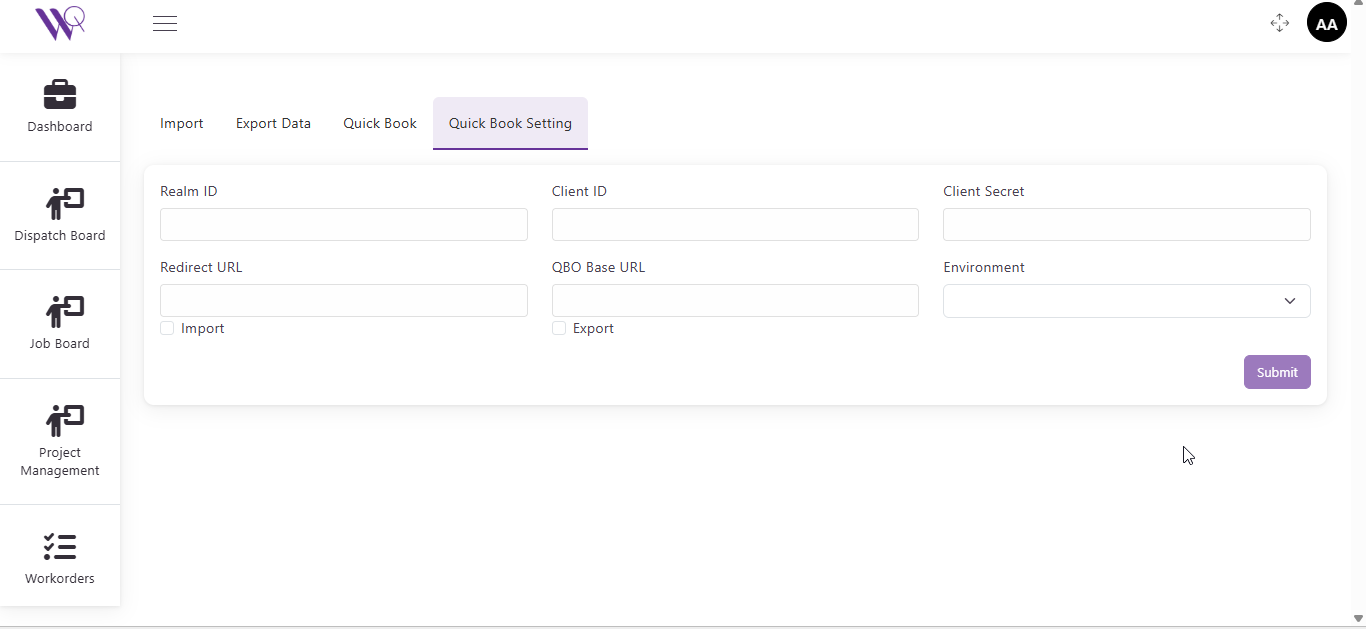
Import/Export Data Tab:
- Import: Data import from QuickBooks
- Export Data: Export to QuickBooks
- Quick Book: Main integration interface
- Quick Book Setting: Configuration panel
Sync to QB (QuickBooks) Interface:
Configuration Options:
- Import/Export checkboxes with toggle functionality
- Sync button for data synchronization
Sync Status Table:
| Modules | Status | Records | Message | Action |
|---|---|---|---|---|
| (Empty awaiting sync data) |
QuickBook Setting Configuration:
Required Fields:
- Realm ID: QuickBooks company identifier
- Client ID: OAuth client identifier
- Client Secret: Authentication secret key
- Redirect URL: OAuth callback URL
- QBO Base URL: QuickBooks Online API endpoint
- Environment: Dropdown selector (Production/Sandbox)
- Import/Export Checkboxes: Toggle data flow direction
Action Buttons:
- Submit: Save configuration (Purple button)
- Quick Book Account Info: View account details
- Connect to QuickBook: Establish connection
Integration Features:
- Real-time data synchronization
- Bidirectional data flow (Import & Export)
- Secure OAuth authentication
- Environment switching (Production/Sandbox)
- Error handling and status reporting
3. Settings & Administration
Settings Menu (Expandable Sidebar):
Configuration Options:
- Vendors: Supplier management
- Divisions: Organizational structure
- Price Book: Service pricing catalog
- Price Book Category: Service categorization
- Team: Employee/technician management
- Email Template: Communication templates
- Tax Codes: Tax rate configuration
- Tags: Labeling system
- Vehicle/Equipment: Fleet management
- Company Setting: Business profile
- Import Export: Data management
Admin Section:
- User role management
- Permission controls
- System configuration
4. Employee Management
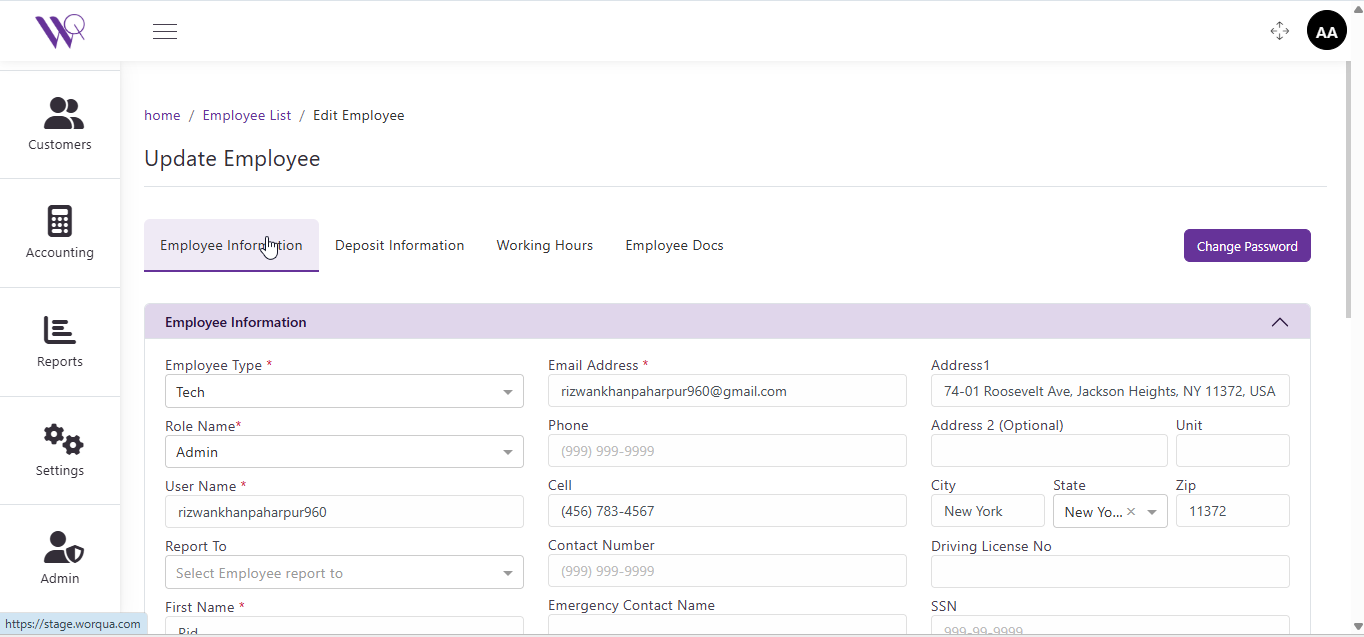
Update Employee Interface:
Navigation:
- Breadcrumb: home / Employee List / Edit Employee
Tab Structure:
- Employee Information (Active)
- Deposit Information
- Working Hours
- Employee Docs
Employee Information Form:
Personal Details:
- Employee Type: Dropdown (Tech selected)
- Role Name: Dropdown (Admin selected)
- User Name: rizwankhanpaharpur960
- Report To: Select Employee dropdown
- First Name: Rizwan (implied)
- Email Address: karam@gmail.com
- Phone: (999) 999-9999
- Cell: (456) 783-4567
- Contact Number: (999) 999-9999
- Emergency Contact Name: [Field]
Address Information:
- Address1: 74-01 Roosevelt Ave, Jackson Heights, NY 11372, USA
- Address 2 (Optional): [Field]
- Unit: [Field]
- City: New York
- State: New York (Dropdown with × clear option)
- Zip: 11372
- Driving License No: [Field]
- SSN: 999-99-9999
Action Button:
- Change Password: Purple button (Top right)
Form Validation:
- Required fields marked with asterisk (*)
- Phone number formatting
- Dropdown selections
- Address autocomplete
5. Work Orders Management
Work Orders Dashboard:
Navigation:
- Breadcrumb: home / Work Orders
Action Buttons:
- Add Work Order: Create new work order (Purple)
- Generate Summary with AI: AI-powered analytics (Purple)
- AI Smart Filter: Intelligent filtering (Purple)
Filtering Options:
- Select Statuses: Multi-select dropdown
- Start Date: MM/DD/YY date picker with calendar icon
- End Date: MM/DD/YY date picker with calendar icon
- Search: Text search button (Purple)
- Reset: Clear filters button (Purple)
Status Indicators:
- 🟡 Yellow: Pending/In Progress
- 🟢 Green: Complete/Dispatched
- 🟠 Orange: In Progress/Paused
Table Features:
- Sortable columns (indicated by arrows)
- Action dropdown buttons (View Invoice/Edit)
- Pagination controls
- Responsive layout
6. AI WorkOrder Summary
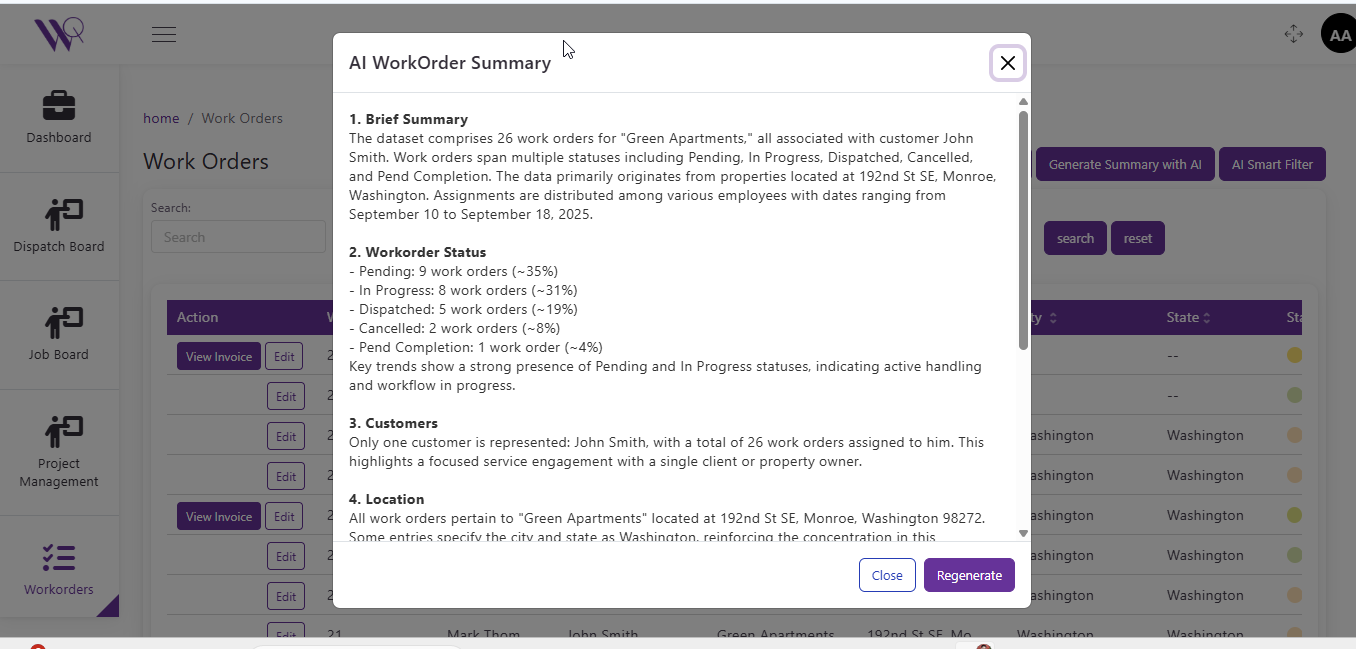
Modal Dialog: “AI WorkOrder Summary”
Generated Summary Content:
1. Brief Summary: The dataset comprises 26 work orders for “Green Apartments,” all associated with customer John Smith. Work orders span multiple statuses including Pending, In Progress, Dispatched, Cancelled, and Pend Completion. The data primarily originates from properties located at 192nd St SE, Monroe, Washington. Assignments are distributed among various employees with dates ranging from September 10 to September 18, 2025.
2. Workorder Status:
- Pending: 9 work orders (~35%)
- In Progress: 8 work orders (~31%)
- Dispatched: 5 work orders (~19%)
- Cancelled: 2 work orders (~8%)
- Pend Completion: 1 work order (~4%)
Key trends show a strong presence of Pending and In Progress statuses, indicating active handling and workflow in progress.
3. Customers: Only one customer is represented: John Smith, with a total of 26 work orders assigned to him. This highlights a focused service engagement with a single client or property owner.
4. Location: All work orders pertain to “Green Apartments” located at 192nd St SE, Monroe, Washington 98272. Some entries specify the city and state as Washington, reinforcing the concentration in this location.
Modal Controls:
- Close: Dismiss modal (White button)
- Regenerate: Create new summary (Purple button)
- X: Close icon (Top right)
Loading State:
- “Generating AI Summary…” with loading spinner animation
- Real-time generation feedback
7. AI WorkOrder Smart Filter
Modal Dialog: “AI WorkOrder Smart Filter”
Interface Elements:
- View Saved Queries: Access previously saved filters (Purple button)
- Enter Prompt: Large text area with placeholder “Type your AI prompt here…”
- Voice Input Icon: Microphone button for voice commands
- Close: Cancel action (White button)
- Generate: Execute AI filter (Purple button)
Functionality:
- Natural language query processing
- Save and recall filter queries
- AI-powered data filtering
- Voice command support
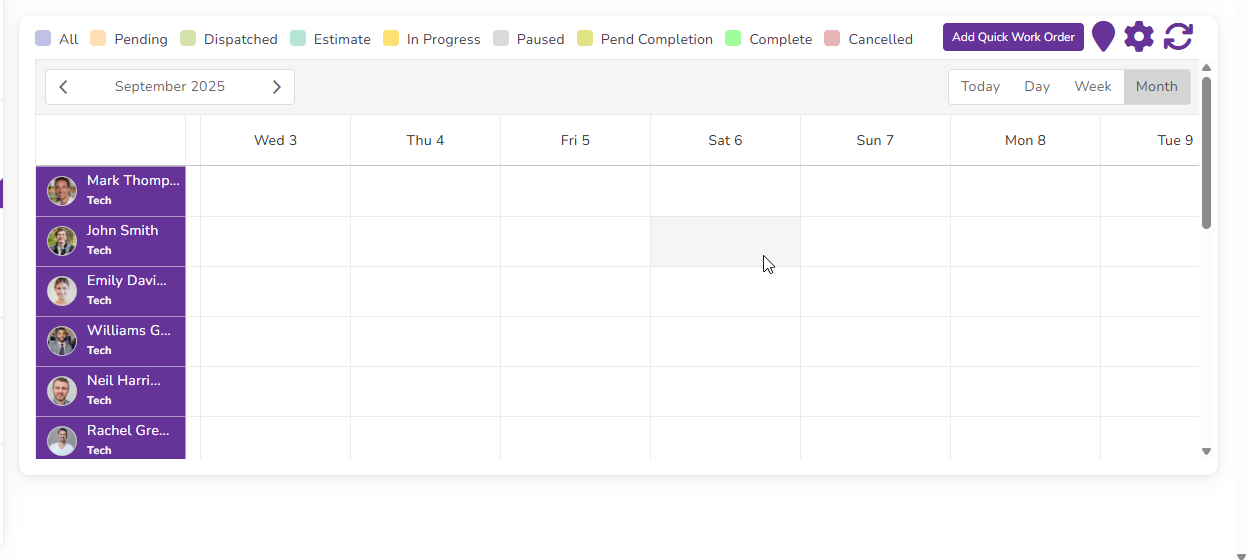
8. Dispatch Board
Navigation Access:
- Sidebar icon with flag symbol
- Quick access from main navigation
View Options:
- Gantt chart view
- Timeline view
- Resource allocation view
9. Job Board Module
Features:
- Job listing and management
- Assignment tracking
- Status monitoring
- Resource allocation
Sidebar Expansion Menu:
- Add Work Order: Create new job
- Workorder List: View all work orders
- Invoice List: Billing management
- Estimated WorkOrder: Quote management